 Village Hall Hub

Heating that follows your diary
Inspire thermostats read your Village Hall Hub bookings, so every room is warm for every event, at the temperature that event needs. When the hall is empty, the heating is off. Nobody has to remember the thermostat, and nobody leaves it on.
Included on every plan · No add-on fee · No credit card to start
From a booking to a warm room
You take bookings exactly as you do now. The temperature goes with each one, through your hall's calendar link, to the thermostat in that room.
You take a booking
Pick the heating level as you take it: Seated, Active, Children, whatever your hall uses.
Fri 8pm to 10pm · Seated 20°C
Your calendar link carries it
A private link for each room, with the times and the temperature. Never who booked.
villagehallhub.co.uk/calendar/….icsBooked · 20:00 to 22:00 · 20°C
Inspire heats the room
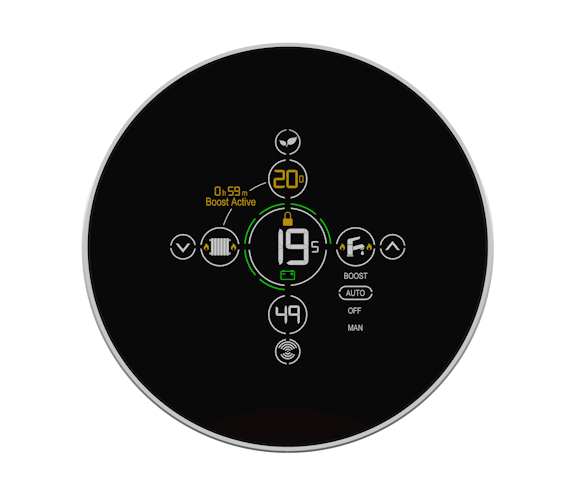
The thermostat reads the link every hour and warms the room in time, then switches off.
 Main Hall
20°C from 7:30pm
Warm when it's booked, off when it isn't
Two bookings in the Main Hall, each with its own temperature. The heating comes on in time for each, and the gap between them costs nothing.
Built for how halls are really used
A toddler group, a whist drive and a badminton club do not want the same temperature, and a hall with three rooms should not heat all three for one meeting.
A temperature for every booking
Name your activities once, each with its temperature, and pick one as you take the booking. It reaches the thermostat with it, and a weekly class carries it to every date.
Room by room
Every room has its own link, so the committee room thermostat only follows bookings in the committee room.
Cancellations taken off
A cancelled booking comes off the calendar and off Inspire's schedule, so the heating does not come on for an event that is not happening.
Confirmed bookings only
An enquiry nobody has said yes to does not heat an empty hall. Only confirmed bookings go to the heating.
Private by design
The heating sees "Booked", the times and the temperature. Names, hirers and notes stay in Village Hall Hub.
Included on every plan
The calendar link and heating levels come with Village Hall Hub. No heating module to buy, and no yearly add-on fee.
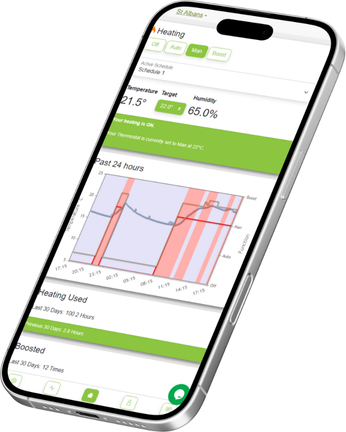
Your diary decides. Inspire's app shows you.
Bookings stay in Village Hall Hub, where the committee already keeps them. Inspire's own app shows what each thermostat is doing: the temperature now, the target, and how much the heating has run.
- Make, move or cancel bookings in Village Hall Hub, and the heating follows within the hour
- Called off at the last minute? Cancel it in the Inspire app too, and the heating stays off
- One place for the diary, one app for the heating, and nothing typed twice
Four steps, one link
Once Inspire's thermostats are fitted, connecting them to your diary is quick.
Talk to Inspire Home Automation. They will recommend the right thermostats for your rooms. Any electrician can fit them, and Inspire can usually help you find one.
In Village Hall Hub go to Bookings › Booking Settings › Heating and add each kind of activity with its temperature, such as Seated at 20 degrees.
It is on the last step of a new booking, Anything else?, and on every existing booking. A repeating booking passes it to every date.
Go to Settings › Heating and copy your Inspire link, one per room if they are heated separately. Paste it into Inspire and set the Check In Offset to your room's warm-up time.
Questions halls ask
What does it cost?
Nothing extra from us. The calendar link and heating levels are part of every Village Hall Hub plan, with no add-on fee and no module to buy. The thermostats, and fitting them, are arranged with Inspire Home Automation directly.
We do not have Inspire yet. Where do we start?
Talk to Inspire Home Automation. They will recommend the right thermostats for each room or zone. Inspire do not fit them themselves: any electrician can, so most halls use their own, and Inspire can usually help you find one if you need it. Once the thermostats are in, connecting them to Village Hall Hub is the quick part.
How quickly does a new booking reach the heating?
Inspire reads your calendar link every hour. Make or move a booking at least an hour before the heating needs to come on and it will be picked up in time.
What happens when a booking is cancelled?
It comes off the calendar, and Inspire removes it on their side at the next hourly check, so the heating does not come on for an event that is not happening. If something is called off within the hour, cancel it in your Inspire app as well.
Can different events have different temperatures?
Yes, and this is the part most systems miss. You name the kinds of activity your hall hosts once - say Seated at 20 degrees, Active at 17, Children at 19 - and pick one when you take each booking. The temperature travels with the booking to the thermostat. A weekly class carries it to every date.
Our rooms are heated separately. Does that work?
Yes. Every room has its own calendar link, so each thermostat or zone follows only the bookings in its own room. There is also one link for the whole hall, with the bookings for every room together, for a hall heated as a single zone.
Will the room be warm when people arrive?
Yes. Set Inspire's Check In Offset to how long your room takes to warm up and the heating comes on that much before the booking starts.
Does Inspire see who has booked?
No. The heating link calls every booking "Booked" and gives only the times and the temperature. Names, hirers and notes never leave Village Hall Hub.
Are provisional bookings heated?
No. Only confirmed bookings are sent to the heating, so an enquiry nobody has said yes to does not warm an empty hall.
Does it work with other heating?
We are working with other heating suppliers too. Each one we support appears on the Heating page in Village Hall Hub, under Settings, as soon as it is ready.
About Inspire Home Automation
Inspire make smart heating controls for homes, holiday lets and community buildings, designed and made in the UK. Their thermostats can follow an online calendar, which is how they read your Village Hall Hub diary, and Village Hall Hub is listed on their calendar page.
Stop heating an empty hall
Bookings, invoices and compliance in one place, and a diary your heating follows by itself. Try it free for 30 days.
Start your free trial30-day trial · No credit card · Cancel anytime